
UniPRINT Print Monitoring System - High-Definition Web Inspection for Print Quality Control
Overview Summary
The UniPRINT Print Monitoring System is a high-definition camera system designed for real-time print quality inspection on narrow and wide web printing and converting lines. It reduces waste and downtime by providing crystal-clear magnified views of the moving web, allowing operators to identify registration issues, color variations, and print defects at production speeds up to 600 m/min. Available in multiple configurations with three software packages (Standard, Touch, and Pro), UniPRINT delivers exceptional performance and value with fast delivery, simple installation, and unmatched local customer service.
Print Monitoring


Unilux UniPRINT Inspection System
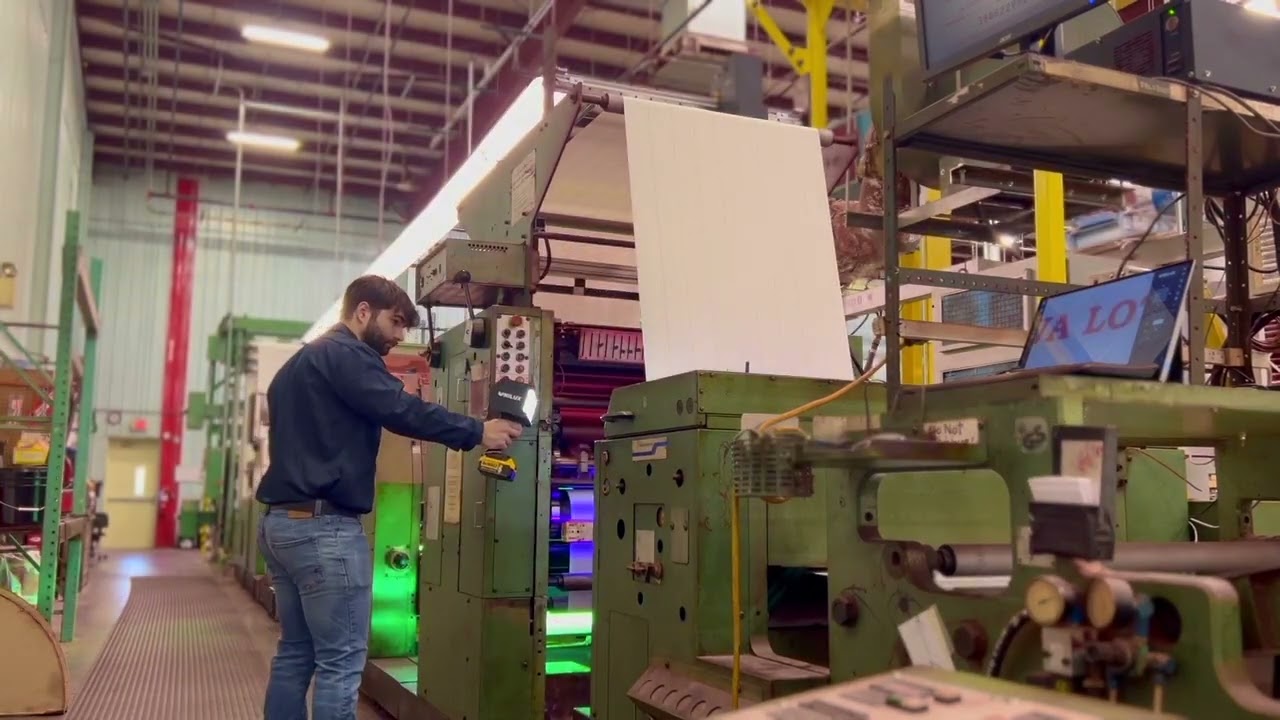
UniPRINT Installation at PAP Technologies

Introducing UniPRINT Print Monitoring from Unilux
What it Does
UniPRINT monitors print quality in-line during production, capturing high-definition images of the moving web with an up to 18X optical zoom and large viewing area. Operators can inspect individual labels, check color consistency, verify registration accuracy, and identify defects without slowing down production. The system's touch-screen interface and programmable features like split-screen comparison, automatic scanning, and stored web positions streamline quality control while reducing scrap and customer complaints. UniPRINT works on flexographic, gravure, web offset, and digital printing processes across labels, flexible packaging, film, foil, and nonwovens.
Primary Applications:
-
Print quality monitoring for label printing (narrow web)
-
Registration and color checking on flexible packaging lines (wide web)
-
Defect identification on film and foil printing operations
-
Process optimization and operator training in converting facilities
Key Capabilities
Inspection Performance
-
Web speed compatibility: Up to 600 m/min (1,968 ft/min)
-
Optical zoom: 18X for detailed defect inspection
-
Traverse speed: Up to 300 mm/sec motorized positioning
-
Resolution: High-resolution progressive scan camera with excellent color reproduction
-
Display: HDMI output at 1920 x 1080 resolution, supports multiple screens via HDMI splitter
Viewing Area Options
-
Model 100: 100 x 130 mm field of view (narrow web, compact design)
-
Model 130: 130 x 100 mm field of view (entry-level wide web)
-
Model 185: 185 x 140 mm field of view (extended wide web coverage)
Inspection Capabilities
-
Label-by-label checking along print repeat
-
Color and registration comparison via split-screen
-
Register mark memory for quick return to critical positions
-
Automatic scanning modes (horizontal, vertical, constant scan)
-
Image capture to external USB drive
Industries Served
-
Label Converting: Narrow web label printing for food, beverage, pharmaceutical, and consumer products
-
Flexible Packaging: Wide web printing for pouches, bags, wraps, and film packaging
-
Film and Foil Converting: Quality control for metallized films, specialty foils, and coated substrates
-
Nonwovens: Print inspection on printed nonwoven materials for medical, hygiene, and industrial applications
FEATURES
-
High-Definition Digital Imaging
-
Powerful 18X Optical Zoom
-
Touch Screen Operation
-
Precision Achromatic Close-up Lens
-
Progressive Scan Camera
-
Large 130 x 100 mm Viewing Area Standard
-
White Light or UV Light Inspection Available
-
Variable Speed Traverse (up to 300 mm/sec)
-
Dual-Camera, Backlit, and XL Rail Options to Fit a Wide Range of Applications

CAMERA MODELS

Model 100 - Narrow Web Configuration
Ideal for: Label presses and narrow web applications up to 100 mm
-
Compact design with fixed 90° camera rotation
-
Large 100 x 130 mm field of view despite small footprint
-
Dual strobes in specially designed light chamber
-
All software packages available

Model 130 - Entry Wide Web Configuration
Ideal for: Mid to wide web applications with exceptional value per dollar
-
130 x 100 mm field of view
-
Dual strobes for bright, even illumination
-
Digital 180° camera rotation
-
All software packages available
-
Best price-performance ratio in its class

Model 130 UV
Inspection of optical brighteners or UV-visible inks and coatings in mid- to wide-web security printing applications. Examples include currency, lottery, anti-counterfeit marks for brand authenticity, and cold-seal verification.

Model 185 - Extended Wide Web Configuration
Ideal for: High-quality wide web inspection requiring maximum coverage
-
Extended 185 x 140 mm field of view
-
Four strobes for superior illumination across larger area
-
Digital 180° camera rotation
-
All software packages available
-
Premium performance for demanding applications
SOFTWARE PACKAGES (STANDARD, TOUCH, OR PRO)
UniPRINT is available in three software configurations to match your operational requirements and budget:
Standard Package
Ideal for: Basic print monitoring with manual or simple motorized control
-
Label checking along repeat length
-
Electronic web edge definition
-
Automatic constant scan modes (vertical and horizontal)
-
Register mark memory for stored positions
-
Split-screen for color/registration comparison
-
Standard keypad with monitor operation
Touch Package
Ideal for: Mid-level operations requiring touch-screen convenience and advanced features
-
All Standard package features
-
Touch-screen monitor for simplified operation
-
Multiview display (4 or 9 simultaneous images)
-
Image capture to external USB drive
-
Smart label checking for numbered sequences
-
Eye mark sync using existing registration marks
-
One-touch positioning for rapid navigation
-
Horizontal automatic constant scan (speed-based and step-based)
-
9 stored scan positions
Pro Package
Ideal for: High-volume operations with multiple jobs and comprehensive quality requirements
-
All Touch package features
-
Jobs database for storing up to 250 job-specific settings
-
Web map creation (full repeat scan for navigation)
-
18 stored scan positions (vs 9 in Touch)
-
Job-specific thumbnails and quick recall
-
Note: Features marked with asterisk require motorized traverse system
Feature | Description | Standard | Touch | Pro |
|---|---|---|---|---|
Label Checking* | Allows the user to check each label along the repeat length. | X | X | X |
Electronic Web Edge* | Left and right positions of the edge of the web as defined by
the operator, when the camera is set at the desired position on either side of the web path. This also allows partial
selection or narrowing of the web width. | X | X | X |
Automatic Constant Scan* | Bypasses the slower speeds and step adjustment and allows the operator to rapidly see the
entire print repeat as quickly as possible by automatically calculating the most optimum settings.
Fast Scan calculates its path based on web parameters set in Job Settings. | X | X | X |
Vertical Automatic Constant Scan* | Automatically moves the camera along the web path direction in a series of steps,
pausing to take several images at each step before moving on to the next position. This mode
also enables the camera to step horizontally across the entire print repeat. | X | X | X |
Register Mark Memory* | Allows the user to store a position along the web to enable a quick return at any time. It can be
used to store any position of interest. At any time during the normal print run, a single button will reposition the camera to the stored position. | X | X | X |
Split Screen | For color/registration comparison. Freeze the image on the left side of the screen for side-by-side image comparison with the moving web. Image comparison will
allow the operator to check color quality throughout the print run and to check deviations in
registration. | X | X | X |
Keypad with Standard Monitor | A simple method of operating the UniPRINT camera and job setup. | X | — | — |
Touch Screen Monitor | Simplify operation by controlling the camera and setting up print jobs with a simple touch interface. | — | X | X |
Multiview* | Displays the last four or nine images captured by the camera, allowing the operator to see four
or nine times the web area with a single glance. | — | X | X |
Image to Disc | Saves the current image to an external USB drive. | — | X | X |
Smart Label Checking | Smart Label Checking streamlines quality control for numbered labels in a sequence by enabling inspection at any given repeat. | — | X | X |
Eyemark Sync | Simplify job setup by using existing registration marks for inspection. This feature eliminates the need to add a dedicated single registration mark per repeat for proper synchronization. | — | X | X |
*Requires motorized traverse system
What Sets It Apart
Crystal-Clear Imaging: UniPRINT's precision achromatic close-up lens and progressive scan camera deliver exceptional image quality that surpasses other systems in its price range, revealing defects that would be missed by lower-resolution competitors.
Scalable Software Architecture: Start with the Standard package and upgrade to Touch or Pro as your needs evolve. Your hardware investment is protected as you add capability without replacing equipment.
Operator-Friendly Interface: Touch-screen operation (Touch and Pro packages) eliminates complex training requirements. Features like one-touch positioning, multi-view display, and stored scan positions streamline daily operation and reduce operator error.
Fast Delivery and Local Support: UniPRINT systems ship quickly with simple installation procedures. Unmatched local customer service provides responsive technical support, training, and service throughout the system lifecycle.
Integration & Support
System Integration: UniPRINT mounts above or below the web path on narrow and wide web converting lines. Motorized traverse systems accommodate variable web widths, while fixed-position installations work for consistent repeat applications. The system integrates with rotary encoders for servo presses and supports eye mark sensors for automated reset and synchronization.
Engineering Approach: Our technical team assists with system sizing, mounting configuration, and software package selection based on your specific printing process, web characteristics, and quality control objectives. We provide installation support, operator training, and ongoing technical assistance.
Job Management: The Pro Software package provides a jobs database which stores all parameters, web maps, and web scan positions for each print job. When reprinting a job, operators restore complete setup in seconds, eliminating manual re-entry and reducing changeover time.
Optional Features and Accessories
Dual-Camera Systems: Monitor both sides of printed web simultaneously or inspect front and back surfaces
Backlit Configuration: Transmitted light inspection for transparent or translucent substrates
Large and XL Rail Options: Extended traverse length for very wide web applications up to 4 meters wide
UV Capability: Add UV inspection to detect optical brighteners and UV-visible inks (see UniPRINT+UV)
Next Step
Discuss Your Application: Contact us to discuss your web width, printing process, typical defects, and quality control goals.
