
Print Monitoring


Unilux UniPRINT Inspection System
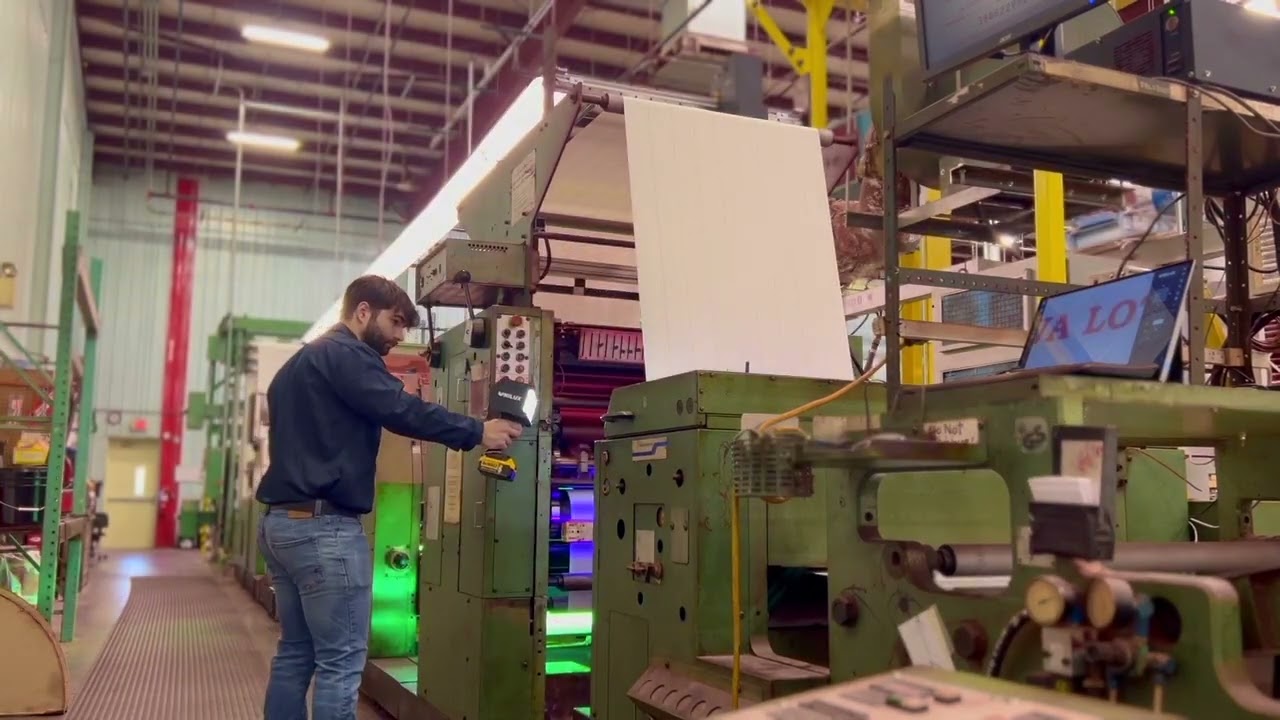
UniPRINT Installation at PAP Technologies

Introducing UniPRINT Print Monitoring from Unilux
What it Does
UniPRINT 视觉检查系统可有效减少浪费,配合细致周到的本地服务和支持,开辟了印刷检查的新时代。UniPRINT提供高清图像浏览和触屏操作,在相同价格范围内提供超过其他印面检查系统的规格参数。 无论您选择标准软件包或升级到更先进的专业版检查功能,您可以确定的是每台UniPRINT系统都会提供卓越的性能和价值。
Primary Applications:
UniPRINT 视觉检查系统可有效减少浪费,配合细致周到的本地服务和支持,开辟了印刷检查的新时代。UniPRINT提供高清图像浏览和触屏操作,在相同价格范围内提供超过其他印面检查系统的规格参数。 无论您选择标准软件包或升级到更先进的专业版检查功能,您可以确定的是每台UniPRINT系统都会提供卓越的性能和价值。
Key Capabilities
Inspection Performance
UniPRINT 视觉检查系统可有效减少浪费,配合细致周到的本地服务和支持,开辟了印刷检查的新时代。UniPRINT提供高清图像浏览和触屏操作,在相同价格范围内提供超过其他印面检查系统的规格参数。 无论您选择标准软件包或升级到更先进的专业版检查功能,您可以确定的是每台UniPRINT系统都会提供卓越的性能和价值。
Viewing Area Options
UniPRINT 视觉检查系统可有效减少浪费,配合细致周到的本地服务和支持,开辟了印刷检查的新时代。UniPRINT提供高清图像浏览和触屏操作,在相同价格范围内提供超过其他印面检查系统的规格参数。 无论您选择标准软件包或升级到更先进的专业版检查功能,您可以确定的是每台UniPRINT系统都会提供卓越的性能和价值。
Inspection Capabilities
UniPRINT 视觉检查系统可有效减少浪费,配合细致周到的本地服务和支持,开辟了印刷检查的新时代。UniPRINT提供高清图像浏览和触屏操作,在相同价格范围内提供超过其他印面检查系统的规格参数。 无论您选择标准软件包或升级到更先进的专业版检查功能,您可以确定的是每台UniPRINT系统都会提供卓越的性能和价值。
Industries Served
UniPRINT 视觉检查系统可有效减少浪费,配合细致周到的本地服务和支持,开辟了印刷检查的新时代。UniPRINT提供高清图像浏览和触屏操作,在相同价格范围内提供超过其他印面检查系统的规格参数。 无论您选择标准软件包或升级到更先进的专业版检查功能,您可以确定的是每台UniPRINT系统都会提供卓越的性能和价值。
性能
-
高精度数字成像
-
强大的18X光学变焦
-
触屏操作
-
精密辨析色差镜头
-
渐进式相机扫描
-
130 x 100毫米大范围检查区域
-
可选标准/白光或紫外线/黑光检测
-
变速导轨(高达300毫米/秒速度)
-
双摄像头、背光以及 XL 导轨选项,适用于多种应用场合。

摄像头型号

Model 100 - Narrow Web Configuration
Model 100 是适用于窄幅印机的理想机型。其特别设计的光室和固定相机可在90 度范围内旋转,能在紧凑的尺寸内实现高达 100 x 130 毫米的广阔视野

Model 130 - Entry Wide Web Configuration
MODEL 130 是一款优秀的入门级宽幅印面检查系统,其性价比远超同等价格范围内的其他竞品。130 x 100 mm 视野范围,18x光学变焦和双频闪灯,图像如水晶般清晰,提供卓越的性能和超高的性价比。

Model 130 UV
应用于中幅至宽幅的防伪印刷和光学增白剂或紫外可见油墨及涂层的检查。此类应用包括货币、彩票、品牌真伪的防伪标签以及冷塑包装等。

Model 185 - Extended Wide Web Configuration
MODEL 185 是高质量宽幅印面检查的理想选择。它为用户提供了由四角度频闪灯照明的 185 x 140 mm 视野范围。
软件包(标准版,触屏版,或专业版)
UniPRINT is available in three software configurations to match your operational requirements and budget:
Standard Package
Ideal for: Basic print monitoring with manual or simple motorized control
-
Label checking along repeat length
-
Electronic web edge definition
-
Automatic constant scan modes (vertical and horizontal)
-
Register mark memory for stored positions
-
Split-screen for color/registration comparison
-
Standard keypad with monitor operation
Touch Package
Ideal for: Mid-level operations requiring touch-screen convenience and advanced features
-
All Standard package features
-
Touch-screen monitor for simplified operation
-
Multiview display (4 or 9 simultaneous images)
-
Image capture to external USB drive
-
Smart label checking for numbered sequences
-
Eye mark sync using existing registration marks
-
One-touch positioning for rapid navigation
-
Horizontal automatic constant scan (speed-based and step-based)
-
9 stored scan positions
Pro Package
Ideal for: High-volume operations with multiple jobs and comprehensive quality requirements
-
All Touch package features
-
Jobs database for storing up to 250 job-specific settings
-
Web map creation (full repeat scan for navigation)
-
18 stored scan positions (vs 9 in Touch)
-
Job-specific thumbnails and quick recall
-
Note: Features marked with asterisk require motorized traverse system
Feature | Description | Standard | Touch | Pro |
|---|---|---|---|---|
One Touch Positioning* | Unique OTP Control allows rapid camera navigation to any part of the web. | — | X | X |
Horizontal Automatic Constant Scan - Speed Based* | HACS speed-based mode automatically moves the camera back and forth across the web and steps along the web path direction when the camera changes direction at the web edge. HACS step-based mode allows for several images to be taken at each position. | — | X | X |
Scan Positions* | Store positions for easy recall. | — | X (9) | X (18) |
Jobs Database | Allows storage of job-specific settings. Job settings, the web map, and thumbnails can
be saved in the database under a specific job name. When a job is reprinted, its
settings are restored in seconds. This feature works best when combined with an optical sensor. | — | — | X |
Webmap* | Creates and saves a full scan or map of the entire print repeat at the touch of a button. This
scanned image can be used to quickly navigate to any position on the web by touching that
point of interest on the web map. | — | — | X |
*Requires motorized traverse system
What Sets It Apart
Crystal-Clear Imaging: UniPRINT's precision achromatic close-up lens and progressive scan camera deliver exceptional image quality that surpasses other systems in its price range, revealing defects that would be missed by lower-resolution competitors.
Scalable Software Architecture: Start with the Standard package and upgrade to Touch or Pro as your needs evolve. Your hardware investment is protected as you add capability without replacing equipment.
Operator-Friendly Interface: Touch-screen operation (Touch and Pro packages) eliminates complex training requirements. Features like one-touch positioning, multi-view display, and stored scan positions streamline daily operation and reduce operator error.
Fast Delivery and Local Support: UniPRINT systems ship quickly with simple installation procedures. Unmatched local customer service provides responsive technical support, training, and service throughout the system lifecycle.
Integration & Support
System Integration: UniPRINT mounts above or below the web path on narrow and wide web converting lines. Motorized traverse systems accommodate variable web widths, while fixed-position installations work for consistent repeat applications. The system integrates with rotary encoders for servo presses and supports eye mark sensors for automated reset and synchronization.
Engineering Approach: Our technical team assists with system sizing, mounting configuration, and software package selection based on your specific printing process, web characteristics, and quality control objectives. We provide installation support, operator training, and ongoing technical assistance.
Job Management: The Pro Software package provides a jobs database which stores all parameters, web maps, and web scan positions for each print job. When reprinting a job, operators restore complete setup in seconds, eliminating manual re-entry and reducing changeover time.
Optional Features and Accessories
Dual-Camera Systems: Monitor both sides of printed web simultaneously or inspect front and back surfaces
Backlit Configuration: Transmitted light inspection for transparent or translucent substrates
Large and XL Rail Options: Extended traverse length for very wide web applications up to 4 meters wide
UV Capability: Add UV inspection to detect optical brighteners and UV-visible inks (see UniPRINT+UV)
Next Step
Discuss Your Application: Contact us to discuss your web width, printing process, typical defects, and quality control goals.
